
Register for A2P 10DLC
Register your business for US text messaging (A2P 10DLC) from inside Phone Clover, so your texts stop getting filtered by carriers.
For admins · Updated Sep 23, 2026
All guides
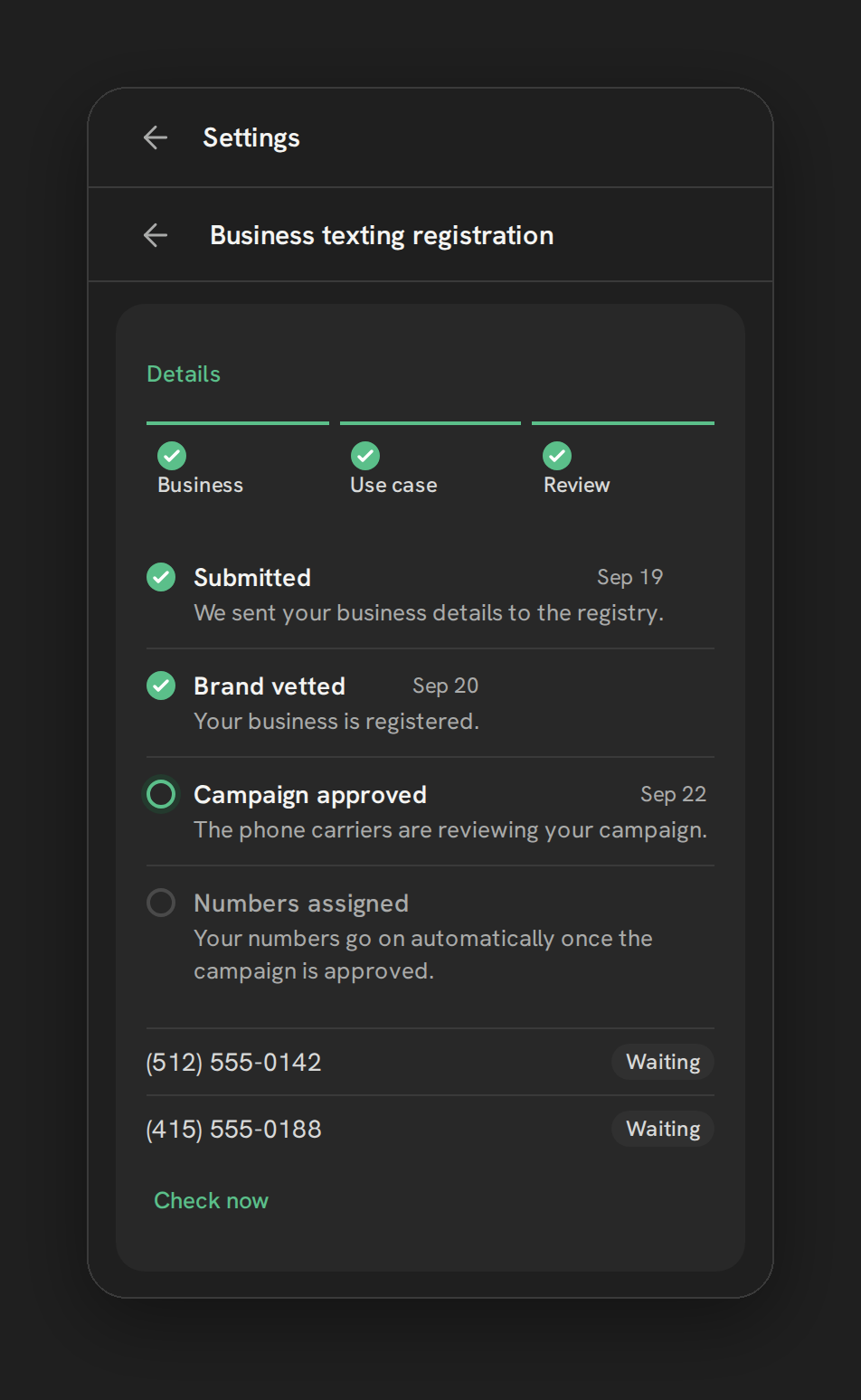
US carriers require every business that sends texts from a local number to register that business first. This is called A2P 10DLC. Without it, carriers filter or block your texts, and delivery gets worse over time. Phone Clover walks you through the registration instead of sending you to Telnyx’s raw forms.
Note: Neither Phone Clover nor HighLevel controls how fast the carriers approve a registration. Nothing about this wizard makes approval faster. It just removes the manual form work.
Before you start
- Who can do this: an admin of the HighLevel sub-account.
- Where: Settings, then the Texting tab, then Business texting registration.
- What you need: your business’s legal details, including a 9-digit EIN, and a short description of how and why you text customers.
Step by step
The wizard is a strip with four steps. The fourth only appears if your account has a toll-free number.
- Business. Enter your business identity: legal name, address, and your 9-digit EIN. Phone Clover only keeps the last 4 digits of the EIN once registration is submitted.
- Use case. Describe what you text customers about and why, with 2 to 5 example messages. You also set your opt-in method (how a contact agreed to receive texts) and how you handle a reply of HELP.
- Review. A timeline shows each registration step and its status. Numbers on the account show a Registered or Waiting chip. A Check now link re-checks status without waiting for the next automatic refresh. If a step fails, a Fix and resubmit button lets you correct it and try again.
- Toll-free. Only shown if you have a toll-free number. Toll-free numbers go through a separate verification form instead of the brand/campaign process above.
What the fees look like
The wizard shows sample figures so you know roughly what to expect. Treat these as reference, not a locked-in price sheet, since Telnyx sets the actual amounts.
| Item | Sample cost |
|---|---|
| Brand registration | About $4 to $5, one time |
| Campaign registration | About $10/month, billed 3 months ahead |
| Carrier review fee | $15 |
| Optional vetting | About $40 |
| Toll-free verification | Free, usually 1 to 2 weeks |
Limits
- One brand and one campaign per sub-account. This is a schema-level limit, not a setting. If your business already has a brand and campaign registered elsewhere, you cannot register a second one here.
- New numbers are not auto-assigned to an approved campaign. If you add a number after your campaign is already approved, use Check now to pick it up, since it does not happen automatically.
- Approval timing is set by the carriers and The Campaign Registry (TCR), not by Phone Clover or HighLevel. There is no faster track available here.
Troubleshooting
A step shows Failed. Open the Review step and read the reason shown next to it. Fix the field it points to (usually a business detail or a use-case description that carriers rejected) and use Fix and resubmit.
A number still shows Waiting after the campaign is approved. Use Check now on the Review step. Numbers added after approval are not picked up automatically.
You already registered this business elsewhere. Phone Clover only supports one brand and one campaign per sub-account. If your business is already registered through another platform, talk to support before starting a second registration, since duplicate brands can cause carrier rejections.