
Voicemail setup
Turn on voicemail for a Phone Clover number, and how voicemails get logged back to HighLevel.
For admins · Updated Sep 23, 2026
All guides
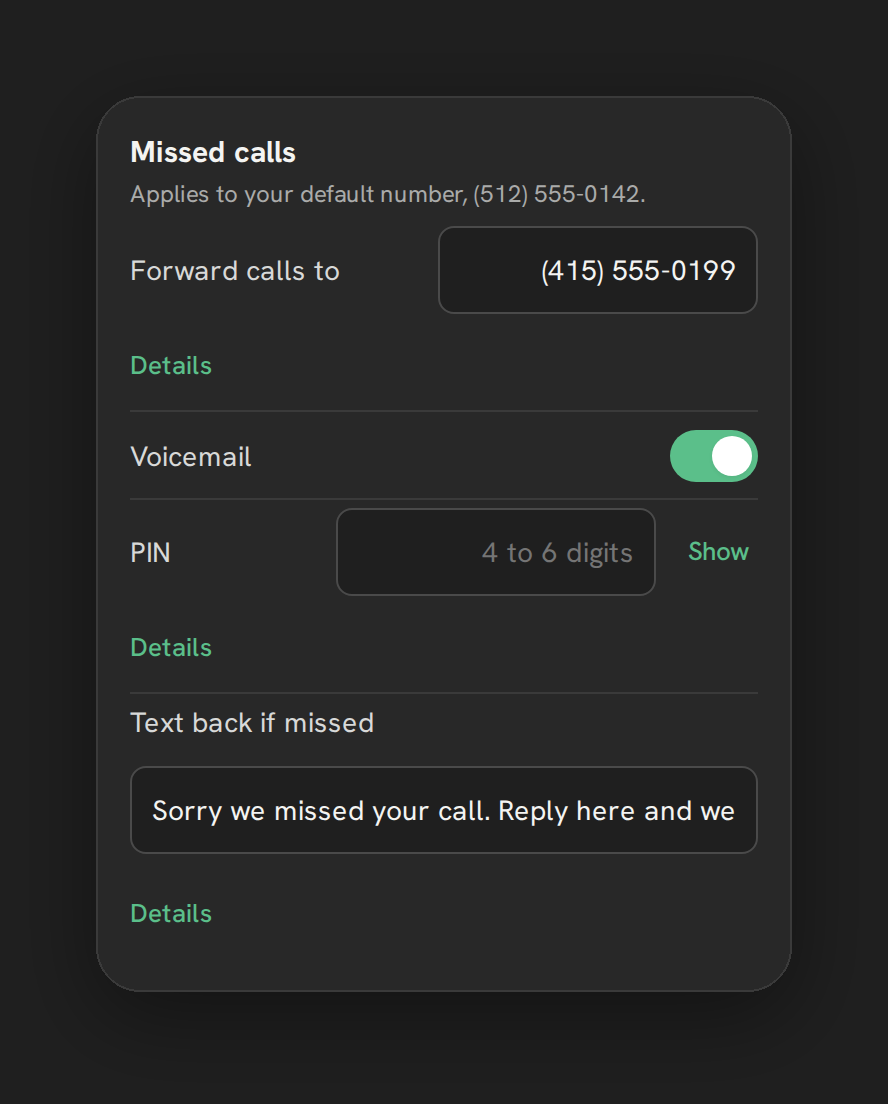
Voicemail lets a caller leave a message when nobody picks up. It is not turned on for a number by default, so if you want callers to be able to leave a message instead of just hearing ringing or a greeting, you need to turn it on.
Who can set this up
An admin, from Settings → Calls → “Missed calls” card, the same card that holds forwarding.
How to turn it on
- Open Settings → Calls in Phone Clover.
- Find the “Missed calls” card.
- Turn on the voicemail switch.
- Optionally set a 4 to 6 digit PIN in the field provided, with a Show/Hide toggle.
Note: Voicemail is off by default. A number with neither voicemail nor forwarding turned on plays a spoken greeting and then hangs up on an unanswered call, with no way for the caller to leave a message.
About the PIN field
The PIN field exists and accepts a 4 to 6 digit value, but Phone Clover’s own voicemail flow inside the app does not use it. It only configures the value on the Telnyx side. If you are relying on retrieving voicemail through a Telnyx-side PIN check outside of Phone Clover, confirm that path separately with your provider setup rather than assuming the field drives anything inside the app.
Where voicemails show up
Every voicemail is logged to HighLevel as a call entry, with the audio attached, so reps see it the same place they see any other call in the timeline and in Phone Clover’s Recents tab. If your sub-account has the AI transcription and summary add-on turned on, a text summary of the voicemail can appear as a note too. See AI transcripts and summaries.
Turning it off
Turn the switch off and save. Phone Clover confirms: “Turn voicemail off for <number>? Callers will
not be able to leave a message.” After that, an unanswered call at the end of your ring flow goes
to the spoken greeting and hangs up instead, unless forwarding is also set up.
Where voicemail fits in the call flow
Phone Clover tries forward first if it is set, then voicemail if it is on, then the spoken greeting. See Forward calls to your mobile phone and Business hours for the rest of that sequence.
Warning: There is no recorded-audio greeting option today. The greeting a caller hears before voicemail, or instead of it, is spoken by text-to-speech from the text you set, not a recording you upload.
Voicemail alongside forwarding
If you have both forwarding and voicemail turned on, Phone Clover tries forwarding first. Voicemail only picks up if the forwarded call also goes unanswered, so a caller does not hear two separate prompts in a row before reaching a person. If you only want callers to leave a message and never ring a personal cell phone, leave forwarding off and turn on voicemail alone.
Checking a voicemail after it comes in
The fastest way to check a new voicemail is the Recents tab on the Phone page, where it shows up like any other call entry with a play control for the audio. You do not need a separate voicemail inbox or app, everything lands inside HighLevel and Phone Clover together.