
The problem
Registering a business for US text messaging means proving who you are to the carriers through The Campaign Registry, a process that involves brand identity, a specific use case description, sample messages and opt-in details, none of which is intuitive if you’ve never done it before. Handled manually, it’s easy to get a field wrong, get rejected, and have no clear path to fix it. GHL’s native answer is its own manual Trust Center form, with the same complexity and no guidance built in.
Agencies rolling out phone and SMS to several sub-accounts feel this the most, since the same fields have to be filled out correctly once per sub-account, and a single typo in a business name or EIN can stall a campaign for days while the rejection gets sorted out. Without a clear status view, an admin often can’t tell whether a stalled registration is waiting on the carriers or on something they need to fix themselves.
Phone Clover’s A2P 10DLC wizard turns that into a guided flow, with a clear status for every step and a way to fix a rejection without starting over from scratch.
How it works in HighLevel
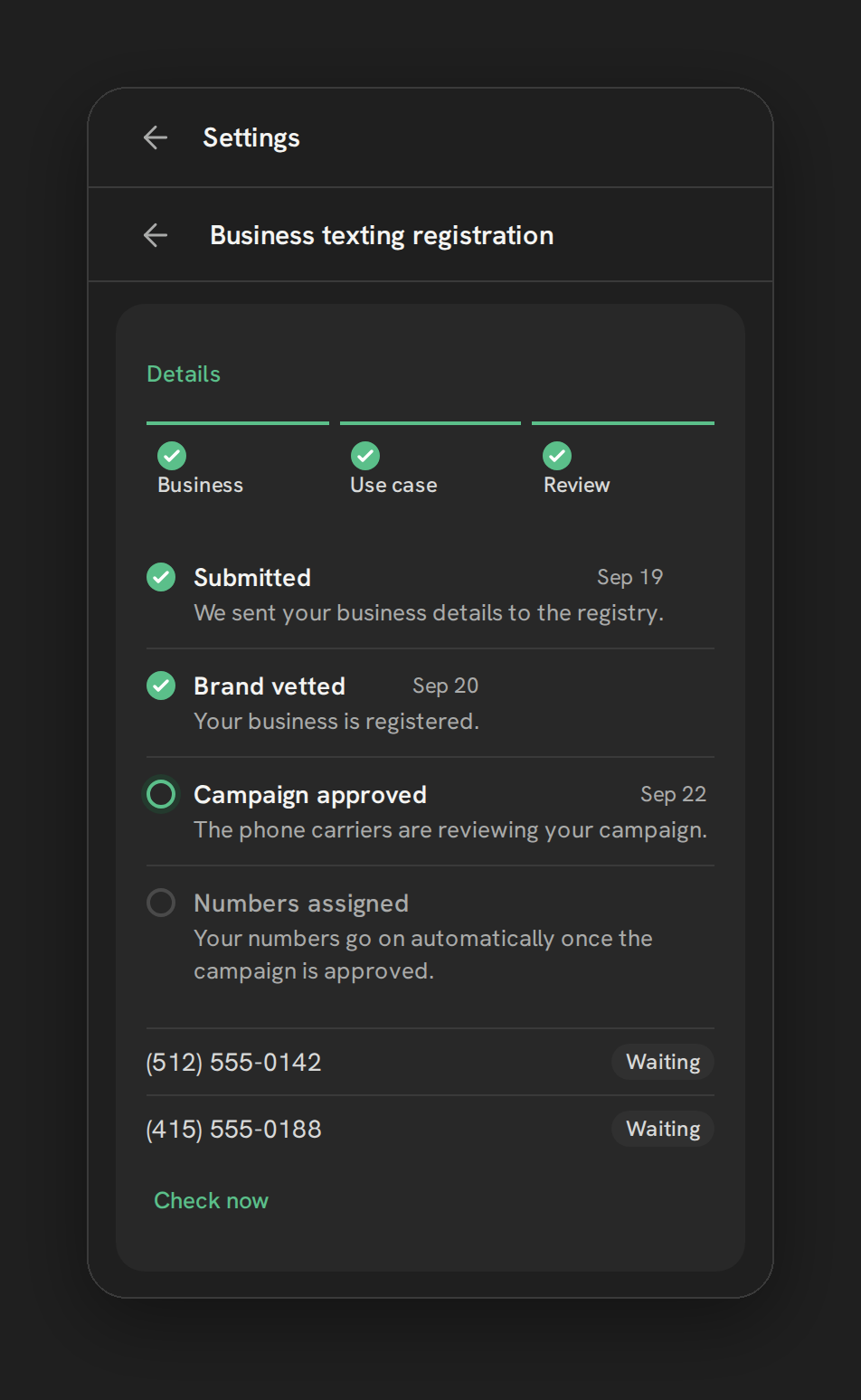
The wizard opens from Settings → Texting → “Business texting registration,” shown as a strip of steps. Business collects your business identity, including a 9-digit EIN; Phone Clover keeps only the last 4 digits once registration is submitted, not the full number. Use case asks what and why you text customers, requires 2 to 5 example messages, and captures your opt-in method along with how HELP-reply requests are handled, all details the carriers require to approve a campaign. Review shows a timeline of every registration step with its current status, per-number chips reading Registered or Waiting, a Check now link to refresh status, and a Fix and resubmit button if any step was rejected. If the account has a toll-free number, a fourth step, Toll-free, appears with its own separate verification form, since toll-free numbers go through a different verification process than standard 10DLC.
Every option explained
| Step | What it collects | Notes |
|---|---|---|
| Business | Business identity fields, including a 9-digit EIN | Only the last 4 digits of the EIN are kept after submission |
| Use case | What and why you text, 2–5 example messages, opt-in method, HELP handling | Required before a campaign can be submitted for review |
| Review | Live status per step, per-number Registered/Waiting chips | Fix and resubmit button on any failed step; Check now to refresh |
| Toll-free | A separate verification form | Only shown if the account has a toll-free number |
Note: Carrier approval timelines vary based on review capacity, not a set schedule.
What runs on Telnyx
Telnyx exposes 10DLC and toll-free verification as an API, which is what lets Phone Clover build a guided wizard on top of it instead of requiring a customer to fill out GHL’s manual Trust Center form directly. The actual brand and campaign submission goes from Telnyx to The Campaign Registry and the carriers for review; Phone Clover’s wizard collects the information and shows the resulting status, but the approval decision itself sits with the carriers.
Sample costs shown inside the app, roughly $4 to $5 one-time for a brand, about $10 a month for a campaign billed 3 months ahead plus a $15 carrier review fee, and optional vetting around $40, with toll-free verification free and typically taking 1 to 2 weeks, are reference figures from Telnyx’s pricing at the time this was written. Treat them as sample numbers, not a guaranteed price sheet, and verify current pricing before publishing anything customer-facing.
Who uses it
An admin runs the wizard once per sub-account, since only one brand and campaign is supported per sub-account. It’s a one-time setup task rather than something reps interact with day to day; once registration is approved, texting simply works more reliably in the background.
What to expect
Only one brand and campaign is supported per sub-account, a hard limit rather than a plan restriction. A number added after the campaign is already approved won’t join it automatically, use the Check now action to pull it in manually. And because carrier approval timing is outside anyone’s control, expect the Review step’s status to sit at a pending state for a while after submission, that’s normal, not a sign something’s broken.
Treat the sample costs shown in the wizard as reference figures, not a locked price sheet, since Telnyx’s own pricing can change. And if a campaign is ever rejected, read the specific reason on the Review step before resubmitting; most rejections trace back to a detail in the business or use case fields that carriers flagged, and fixing that same detail is almost always faster than starting a brand-new registration from scratch.