
Record a post-call outcome
Every call ends with a "How did it go?" card. Here is what each outcome does and when it is required.
For reps · Updated Sep 23, 2026
All guides
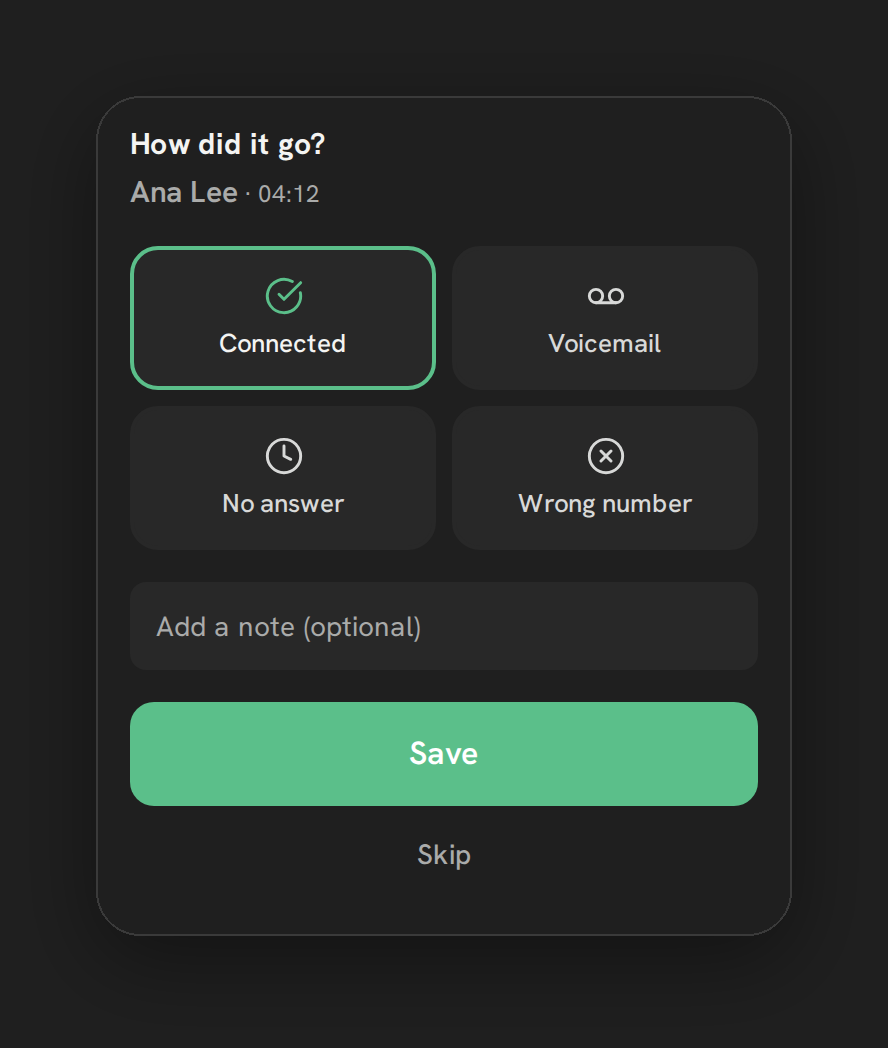
After every call, Phone Clover asks what happened. This is how the dashboard, the “to call back” list, and any follow-up tasks stay accurate, without you having to write a note by hand every time.
The outcome card
A card titled “How did it go?” appears as soon as a call ends. It shows four built-in tiles:
- Connected
- Voicemail
- No answer
- Wrong number
Below the tiles is an optional note field (up to 200 characters), and Save and Skip buttons.
When it is required
Outside a calling list, the card auto-dismisses after 20 seconds if you do nothing, so a quick personal call does not force you to stop and log it.
Note: Inside a running calling list, an outcome is mandatory. The dialer will not move to the next contact until you pick one.
What picking an outcome does
Saving a built-in outcome logs it against the call in the dashboard’s call log, so it shows up in call log filters and in by-rep stats. If the outcome is No answer, that call also becomes eligible for the to-call-back list if nobody has called the contact back within 7 days.
If your admin has set up custom outcomes, those appear below the four built-in tiles. Picking one can also apply a tag to the contact and create a follow-up task automatically. See Custom outcomes, tags and tasks.
Adding a note
The note field is optional and capped at 200 characters. Use it for anything the outcome tile alone does not capture, for example what a voicemail said or what the contact asked for. The note is written to the contact’s HighLevel record.
Limits
- The note field is capped at 200 characters.
- The card auto-dismisses after 20 seconds outside a calling list; inside a list it stays open until you pick something.
- Saving an outcome twice on the same call is possible, and if the outcome creates a follow-up task, saving it twice creates a second task. Save once per call.
- There is no built-in “open a booking link” action on the outcome card.
Troubleshooting
I skipped an outcome by accident and want to add one. The card only appears right after the call ends. Once it is dismissed, go to the contact in HighLevel and add a note or tag manually for that call.
A calling list will not move to the next contact. Check whether the outcome card is still open and waiting for a selection. Inside a list, an outcome is required before the next call starts.
I saved the wrong outcome. There is no undo on the outcome card itself. Correct the tag or note directly on the contact in HighLevel, and if a follow-up task was created that you do not want, delete it there.