
Number health radar
See which of your numbers carriers are flagging for spam, and optionally move texting to a healthy number automatically.
For admins · Updated Sep 23, 2026
All guides
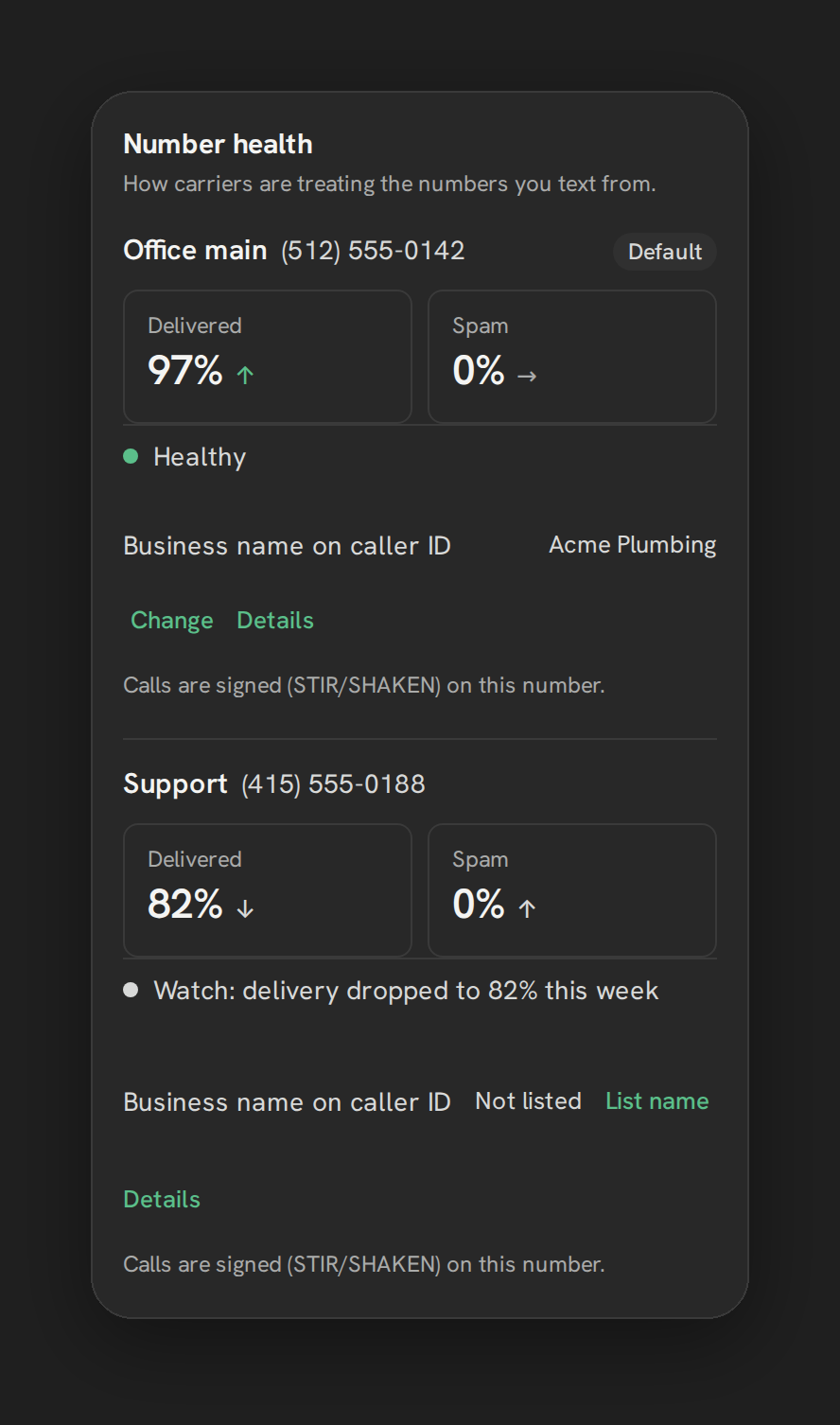
Carriers quietly rate every number that sends texts. A number that gets flagged too often loses deliverability, and by default you would not find out until a rep asks why a text never arrived. Number health radar watches this for you and shows the trend per number.
Note: This only affects US-to-US calls and texts to T-Mobile and Verizon mobile numbers. It is not a blanket fix for every “Spam Likely” label you might see elsewhere.
Where to find it
Settings, then the Texting tab, then the Number health card. Each number on the account gets its own row.
What it shows
- Delivered and Spam tiles with a trend, per number.
- An overall status line for the number, plus an optional note such as “Paused automatically:
<reason>” when auto-rotate has moved texting off it. - CNAM (the caller-ID name shown to recipients).
- Whether STIR/SHAKEN signing is active on that number.
Auto-rotate
A switch at the bottom of the card, labeled “Pause a number that gets flagged.” It is disabled, with help text explaining why, until the sub-account has at least 2 enabled numbers. Turn it on and Phone Clover automatically moves texting to the healthiest number when one gets flagged, then moves it back once the flagged number recovers.
Thresholds:
| Condition | Result |
|---|---|
| Spam ratio above 1%, or success ratio below 85% (at least 20 messages sent) | Number marked unhealthy |
| 72 hours pass without another flag | Number is eligible to be marked healthy again |
The top-bar badge
An amber dot reading “Check number health” appears in the top bar whenever at least one number on the account is unhealthy. It checks every 5 minutes and is clickable only for admins.
Warning: This is not a spam-label removal tool. Your name showing correctly on the carriers that matter is what this feature does. It does not remove “Spam Likely” labels broadly, and it does not cover carriers other than T-Mobile and Verizon.
Limits
- Auto-rotate needs at least 2 enabled numbers to turn on.
- Coverage is scoped to US-to-US calls to T-Mobile and Verizon mobile numbers. Other carriers and international traffic are not covered by this feature.
Troubleshooting
Auto-rotate is greyed out. You need a second enabled number on the account before you can turn it on. Add one from Settings, then the Numbers tab.
A number shows Paused automatically. Read the reason on that row. Texting has moved to another number while this one recovers. It is expected behavior, not an error, and it reverses itself once the number is healthy again for 72 hours.
A number’s spam ratio looks wrong. The ratio only updates as messages are sent from that number. A number that has barely sent anything will not have a meaningful trend yet.