
Filter the call log
Narrow the dashboard's call log by direction, outcome or rep, and expand a row to see recording and AI summary.
For everyone · Updated Sep 23, 2026
All guides
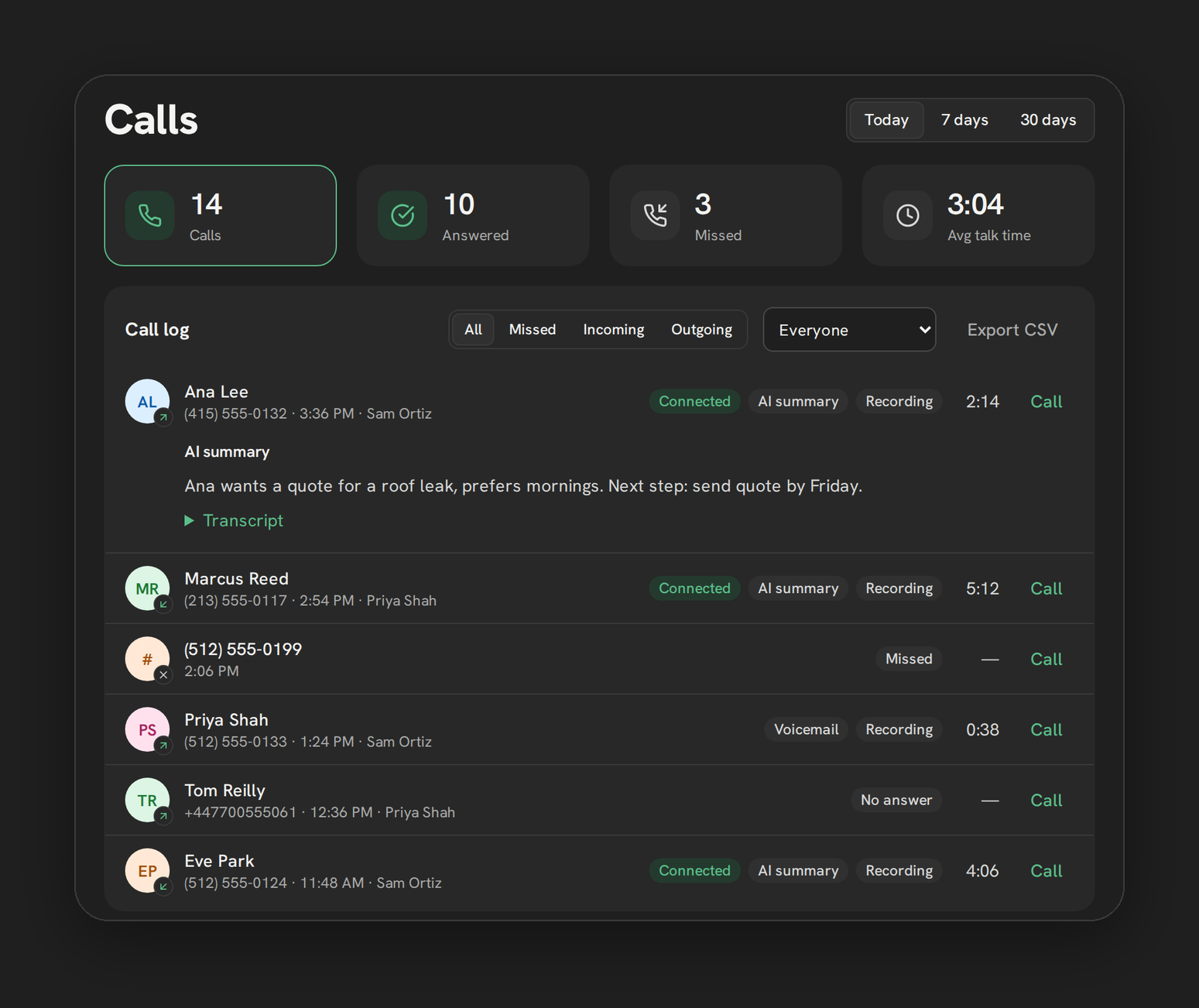
The call log sits below the stat tiles on the dashboard and lists every call for the selected period. The filters above it let you narrow that list down to exactly what you are looking for.
The filter buttons
Four filters sit above the call log:
- All: every call in the period
- Missed: calls that went unanswered
- Incoming: inbound calls only
- Outgoing: outbound calls only
Clicking the Calls or Missed stat tile above the log applies the matching filter automatically, so you do not have to click twice.
The rep filter
An additional filter, admin only, narrows the log to one rep. It only appears once a sub-account has 2 or more reps, and defaults to “Everyone.” This is the fastest way for an admin to check what one specific rep has been doing without exporting anything. See By rep stats for the summarized version of the same data.
Expanding a row
Click a row to expand it. An expanded row can show:
- A recording player, if the call was recorded.
- An “AI summary” heading and text, if the paid transcription add-on ran on that call.
- A collapsible transcript, under the same condition.
If none of these are available for a given call, the row expands to just the call details with no extra sections.
Note: AI summaries and transcripts only appear on calls where the transcription add-on is turned on for your sub-account and the call had a recording. This is a paid add-on, off by default.
How this combines with the period
Filters apply within whichever period is selected (Today, 7 days, 30 days) at the top of the dashboard. Switching the period does not reset the filter; switching the filter does not reset the period. Change both if you need, for example, “my missed calls in the last 30 days.”
Limits
- The rep filter only shows once there are 2 or more reps on the sub-account, and it is admin only.
- There is no way to filter by outcome (Connected, Voicemail, and so on) directly, only by direction and missed status.
- A background refresh will not collapse or rebuild a row you already have open, so an expanded recording keeps playing even as new calls come in.
Troubleshooting
I do not see a rep filter. Either your sub-account has only one rep, or you are logged in as a rep rather than an admin. Only admins on multi-rep sub-accounts see this filter.
A row will not expand. Confirm the call actually has a recording or transcript available. A call with neither shows only the basic details when expanded.
The filtered list looks empty. Double check the period at the top. A filter set to “Missed” with the period set to “Today” will look empty if nothing has been missed yet today.